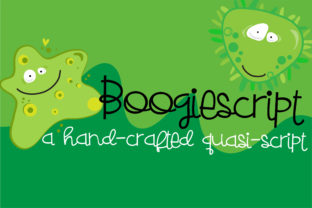
Boogiescript
Boogiescript is a casual, hand-crafted quasi-script font with upright, stiff lettering and a gentle whimsy—like chalk on a sunlit sidewalk or ink sketched by someone who’s smiling while they write. It’s not a true script (no connecting strokes), but it carries the warmth and personality of one. Designed to pair thoughtfully with its sister typeface ZP Boogieman, Boogiescript shines in contexts where friendliness meets clarity: boutique packaging, playful brand identities, classroom posters, wedding stationery, and social media graphics that need charm without sacrificing legibility.
“It’s cute—I’ll use it for everything” is the first misstep
Because Boogiescript feels approachable and handmade, many designers—especially beginners—reach for it instinctively for headlines, body text, buttons, and even logos. But upright quasi-scripts like Boogiescript aren’t built for dense reading. Its even weight, minimal contrast, and deliberate stiffness reduce visual rhythm at small sizes or in long paragraphs. Using it for a blog’s body copy or a product description page may look charming at first glance—but users often scroll faster, skim more, or even abandon content when readability dips.
A better approach? Reserve Boogiescript for short, high-impact uses: a tagline over a hero image, a section divider, a call-to-action button label, or pull quotes in a newsletter. Pair it intentionally: ZP Boogieman (its bolder, slightly more structured sibling) works beautifully as a headline companion, while a clean sans-serif like Inter or Open Sans handles body text with quiet reliability.
Assuming it works the same way as true scripts—or other display fonts
Boogiescript doesn’t connect letters, so it won’t behave like Lobster or Great Vibes in design software. No ligatures, no contextual alternates, no automatic entry/exit swashes. That’s intentional—it’s meant to feel steady, not fluid. Yet some users expect automatic kerning adjustments across all character pairs, or assume OpenType features like stylistic sets will be present. They’re not. Boogiescript is deliberately minimal in its typographic toolkit.
This isn’t a flaw—it’s a design decision aligned with its voice. But overlooking it leads to uneven spacing in words like “coffee,” “museum,” or “three,” where tight letterfit matters. The fix is simple: manually adjust tracking for headlines (try +10 to +25 units in most apps), and always preview at actual size—not just zoomed-in thumbnails. On screens, test how “Boogiescript” renders at 24px on mobile: if the ‘g’ and ‘s’ visually collide, loosen the tracking before exporting.
Downloading free versions without checking licensing or quality
You’ll find Boogiescript listed on several free font aggregators—but many are outdated, incomplete (missing bold or italic variants), or redistributed without permission. Worse, some lack proper hinting for screen use, causing fuzzy rendering on Windows or older browsers. Others bundle malware-laden installers or redirect to ad farms.
Always go directly to the source: the official foundry site or trusted platforms like Creative Market or MyFonts. Check the license details carefully. Personal use ≠ commercial use. If you’re designing a logo for a client’s Shopify store or embedding Boogiescript in a SaaS dashboard, you’ll likely need an extended or webfont license. Skipping this step risks takedown notices, rework delays, or unexpected fees later.
Overlooking how it performs in real-world contexts
Boogiescript’s upright stance gives it stability—but also makes it sensitive to background contrast and texture. It reads beautifully on soft pastel gradients or matte paper, yet can vanish against busy photos, grainy textures, or low-contrast color combos like charcoal gray on slate blue. Similarly, its whimsy softens under heavy shadow effects or aggressive stroke outlines—common “fixes” for poor contrast that actually dilute its hand-crafted authenticity.
Before finalizing a layout, ask: Does this usage support the tone I want—or compete with it? For example, pairing Boogiescript with sharp geometric icons or ultra-thin lines can unintentionally create visual dissonance. Instead, try rounding corner radii on UI elements, using textured brushes in illustrations, or choosing photography with natural light and gentle focus. Consistency in mood matters more than contrast alone.
Thinking pairing is optional—not strategic
Because Boogiescript stands out, it’s tempting to treat it as a solo act. But typography is relational. Its strength lies in contrast and cohesion—not isolation. When used without thoughtful pairing, Boogiescript can feel disconnected, overly sweet, or oddly formal (that upright posture has presence).
ZP Boogieman wasn’t designed as decoration—it’s Boogiescript’s structural counterpart. Where Boogiescript offers rhythm and lightness, ZP Boogieman adds grounded emphasis. Use them together: Boogiescript for subheads or quotes, ZP Boogieman for main headlines or logos. For neutral balance, choose a humanist sans-serif with open apertures (like Nunito or Lato) rather than a rigid neo-grotesque (e.g., Helvetica Neue). Test combinations at actual scale—on device, in browser, in print proof—and note where your eye lingers or stumbles.
What to check before downloading or deploying Boogiescript
- Character set: Does it include accented characters you need? (e.g., for Spanish, French, or Scandinavian markets)
- Weight options: Most versions offer Regular only—so ensure it’s sufficient for your hierarchy needs
- Web performance: If using via @font-face, check file size (ideally under 60 KB WOFF2) and whether it supports variable font tech
- Rendering consistency: Preview in Safari, Chrome, and Firefox—not just your design app
- Licensing scope: Does it cover your use case? Embedding in PDFs? Generating dynamic text in an app? Selling merchandise?
Boogiescript isn’t a shortcut to “personality”—it’s a tool with specific tonal boundaries and functional limits. Respect those, and it becomes quietly powerful: memorable without shouting, warm without cloying, distinctive without distracting. Whether you're naming a ceramic studio, launching a mindful wellness blog, or designing a kindergarten newsletter, its upright whimsy lands best when guided—not assumed.
Start small. Test one application. Compare it side-by-side with alternatives—not just visually, but in context. Then let its quiet confidence do the work.