Cutie Day
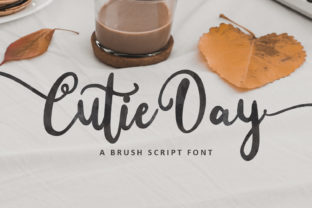
There’s a reason Cutie Day stands out among playful script fonts: it balances charm with clarity, energy with legibility, and whimsy with professionalism. Designed to feel hand-drawn yet polished, it’s not just “cute”—it’s intentionally expressive, modern, and versatile. Whether you're designing a boutique logo, crafting an Instagram quote graphic, or printing a classroom poster, Cutie Day brings warmth without sacrificing readability. But like any expressive font, its success depends less on how it looks in isolation—and more on how thoughtfully it’s chosen, paired, and applied.
Assuming It Works Everywhere—Without Testing
Many creators download Cutie Day and drop it into a social media banner or website headline, expecting instant appeal. But script fonts—even well-designed ones—can falter in low-resolution settings, small sizes, or tightly spaced layouts. For example, using Cutie Day at 12pt for body text in an email newsletter often leads to blurred letterforms and uneven spacing, making words harder to scan. Similarly, embedding it in a WordPress theme without web-optimized file formats (like WOFF2) may slow load times or trigger fallback fonts mid-page.
Before committing, test it across real use cases: resize it on mobile, preview print proofs at actual scale, and check contrast against your background color. If letters like “a,” “g,” or “s” start to merge or vanish, scale up or add subtle letter-spacing. Better yet—reserve Cutie Day for headlines, short quotes, or logos, and pair it with a clean sans serif (like Inter or Poppins) for supporting text.
Misjudging Licensing—and Overlooking Use Cases
Cutie Day is often offered under multiple licenses: free for personal use, but requiring a commercial license for business applications. That distinction matters—not just legally, but practically. Using the free version on a client’s product packaging, Shopify store banner, or paid workshop slide deck risks takedowns or licensing fees later. Worse, some users assume “free download = free forever,” then discover the font lacks OpenType features (like ligatures or stylistic alternates) needed for refined typography.
Always check the license *before* finalizing a design system. If you run a small bakery and want Cutie Day on your menu board, website, and Instagram posts, purchase the appropriate commercial license. And if your project needs multilingual support (e.g., accented characters for Spanish or French copy), verify the font includes those glyphs—many playful scripts omit them entirely.
Over-Pairing—or Under-Pairing—with Other Fonts
Because Cutie Day carries strong personality, it’s tempting to either overcompensate (“Let’s add three more decorative fonts!”) or oversimplify (“Just use Arial everywhere else”). Neither serves the design. Too many competing styles dilute focus; too little contrast makes Cutie Day feel isolated or arbitrary.
A better approach? Choose one clear typographic role for Cutie Day—usually display text—and support it with *one* highly legible, neutral companion. For branding, try pairing it with a geometric sans (like Montserrat) for clean contrast. For educational handouts, a friendly humanist sans (like Nunito) maintains approachability without visual noise. Avoid other scripts or overly ornate serifs—they’ll compete, not complement.
Ignoring Color, Contrast, and Context
Playful fonts like Cutie Day thrive in thoughtful color environments—but they’re especially sensitive to contrast. A light pink Cutie Day headline on a pale peach background might look dreamy on screen but vanish when printed or viewed by someone with mild visual impairment. Likewise, placing it over busy photos or textured backgrounds can blur its delicate strokes.
Run a quick contrast check using free tools like WebAIM’s Contrast Checker. Aim for at least 4.5:1 for normal text (and 3:1 for large headings). When layering over imagery, add a subtle semi-transparent overlay or soft drop shadow—not heavy enough to distract, just enough to ensure readability. And remember: context shapes perception. Cutie Day feels joyful on a children’s book cover but may undercut seriousness in a financial advisor’s report. Match tone to audience expectation—not just aesthetic preference.
Skipping Kerning Adjustments and Spacing Tweaks
Even great script fonts rarely ship with perfect default spacing for every word. With Cutie Day, certain letter combinations—like “To,” “We,” or “ll”—can appear awkwardly tight or loose. Auto-kerning in design apps helps, but it’s not foolproof. Ignoring this leads to inconsistent rhythm, unintended visual breaks, or even misread words (“co okies” instead of “cookies”).
Spend five minutes manually adjusting tracking and kerning in your headline. In Adobe apps, use the Character panel; in Figma or Canva, enable “kerning” or adjust letter-spacing incrementally. Look for balance, not uniformity—some space variation is natural in hand-drawn styles. If you’re using Cutie Day for a logo, treat each word as a custom lockup: refine spacing until it feels cohesive, not mechanical.
Expecting It to Solve Brand Identity Alone
No font—not even one as lively as Cutie Day—carries brand meaning by itself. Slapping it onto a generic template won’t make your business feel more authentic or memorable. What gives Cutie Day impact is *how* it’s integrated: consistent sizing, intentional color palettes, thoughtful iconography, and aligned voice in copy.
Think of it as one instrument in an ensemble. A handmade ceramics shop might use Cutie Day for its “Hand-thrown with love” tagline—but pair it with warm earth tones, soft photography, and gentle, conversational language. That consistency builds recognition far more than the font alone ever could.
What to Check Before You Download or Buy
- Licensing scope: Does it cover your intended use (web, app, merchandise, client work)?
- Character set: Includes punctuation, numerals, accented letters, and symbols you’ll actually need?
- File formats: Offers WOFF2 for web, OTF/TTF for design apps, and variable options if flexibility matters?
- Technical support: Is there documentation or responsive creator support if you hit rendering issues?
- Update history: Has the font been maintained recently? Outdated files may lack modern OpenType features or bug fixes.
Cutie Day earns its place in thoughtful design—not because it’s trendy, but because it invites connection. When used with intention, it adds humanity to digital spaces, warmth to printed materials, and personality to otherwise ordinary messages. The goal isn’t to use it everywhere—it’s to use it where it lifts your message, not distracts from it.