Gingerbread Duo
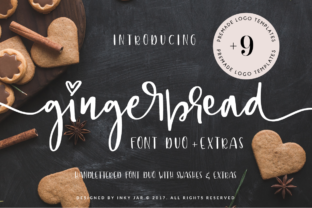
If you're drawn to soft curves, playful charm, and hand-crafted warmth in your typography—especially for feminine brands, wedding stationery, boutique packaging, or lifestyle blogs—you’ve likely encountered Gingerbread Duo. It’s not just another script font. This bouncy, hand-lettered font duo stands out with intentional rhythm, expressive swashes, and a thoughtful collection of illustrations that behave like visual extensions of the letters themselves. What makes it especially useful isn’t just its aesthetic—it’s how thoughtfully it’s built for real-world application.
Why People Reach for Gingerbread Duo (and Why Some End Up Disappointed)
Designers and small business owners often choose Gingerbread Duo because it promises elegance without stiffness—and delivers on that promise *if used intentionally*. Its two fonts (a primary script and a coordinating sans-serif) are designed to harmonize, not compete. The swashes aren’t random flourishes; they’re carefully spaced and weighted to flow naturally at word beginnings and endings. And those 2 extra sets of stylistic alternates? They let you fine-tune tone: softer for a baby brand, bolder for a luxury candle line, more delicate for a handmade soap label.
Yet some users end up frustrated—not because the font is flawed, but because they treat it like a plug-and-play solution. They drop it into a logo mockup without adjusting letter spacing, ignore the stylistic alternates entirely, or try to force it into dense body text where legibility suffers. That mismatch between expectation and execution leads to flat results, wasted time, or even client pushback.
A Common Oversight: Skipping the Alternates (and Losing Personality)
One of the most frequent missed opportunities? Not exploring the two additional sets of beginning and ending letterforms. These aren’t decorative extras—they’re functional tools. For example, the “G” in “Gingerbread” might look lovely with a sweeping upward loop in one context—but that same loop could collide awkwardly with a preceding “d”. The alternate set gives you a tighter, lower-contrast entry stroke instead. Without checking those options, you risk inconsistent rhythm or unintended visual tension.
Better approach: Type out your full brand name or headline in Illustrator or Photoshop, then cycle through the OpenType features panel (Window > Type > Glyphs or OpenType). Try each alternate on key letters—especially first and last characters—and compare how the word breathes as a whole. You’ll often find that swapping just two letters transforms the entire impression.
Misjudging Use Cases: When “Feminine” Doesn’t Mean “Everywhere”
Gingerbread Duo shines in headlines, logos, invitations, and short-form social graphics—but it’s not built for long paragraphs, mobile app interfaces, or technical documentation. Some buyers assume “feminine font” equals “versatile font”, then use it for email newsletters or product descriptions. The result? Readers strain to decode words, bounce faster, and associate your brand with effort—not ease.
This isn’t a limitation of the font; it’s a matter of typographic fit. Think of it like choosing footwear: ballet slippers are beautiful and expressive, but you wouldn’t hike a mountain in them. Similarly, pair Gingerbread Duo with a clean, highly legible sans-serif (like Montserrat or Inter) for supporting text. That contrast doesn’t dilute femininity—it grounds it.
What to Check Before You Buy—or Use—Gingerbread Duo
- Test it in your actual medium: If you’re designing for Instagram Stories, preview your headline at 1080×1920 pixels—not just on desktop. Swashes can blur or pixelate if scaled too small.
- Verify software compatibility: While the OTF files work in most modern design apps, some older versions of Canva or free editors may not support OpenType features like stylistic alternates. Confirm your tool supports glyph substitution before committing.
- Review the logo templates’ flexibility: The included 9 premade logo templates (and their AI/PSD source files) are starting points—not finished assets. Look closely at layer organization, color separation, and whether text is outlined. A well-structured PSD file lets you swap colors in seconds; a flattened AI file means reworking from scratch.
- Assess licensing scope: Are you using it for a personal blog? A client’s e-commerce site? Merchandise? Double-check the license terms—some versions allow unlimited commercial use, while others restrict resale or SaaS integration.
The Bonus Files: Helpful Only If You Know How to Use Them
The Adobe Illustrator and Photoshop files with 9 premade logos are genuinely valuable—but only if you understand what’s editable and what’s baked in. In the Illustrator file, check whether swashes are live text (editable via OpenType) or outlines (static). In the Photoshop file, verify layer naming and blending modes: poorly labeled layers slow down customization, and hard-coded shadows or textures limit adaptability across brand applications.
Realistic example: A freelance designer used one of the logo templates for a client’s bakery, then realized the pink-and-gold gradient was embedded as a raster layer—not a vector fill. Redoing it took 45 minutes instead of 5. A quick pre-check would’ve saved time and preserved client trust.
Final Thought: Let Gingerbread Duo Do What It Does Best
You don’t need to force this font into every corner of your project. Its strength lies in moments of emphasis: a logo lockup, a hero section headline, an invitation monogram, or a social media quote graphic. When you match its expressive energy with smart hierarchy, appropriate pairing, and deliberate alternates, it stops being “just a font” and becomes part of your brand’s voice.
Before downloading or purchasing, ask yourself: Is this solving a specific visual need—or am I hoping it solves everything? Clarity here prevents mismatched expectations, wasted licenses, and last-minute redesigns. With Gingerbread Duo, the magic isn’t in the abundance of swashes or illustrations—it’s in knowing which ones to keep, which to soften, and which to leave out entirely.