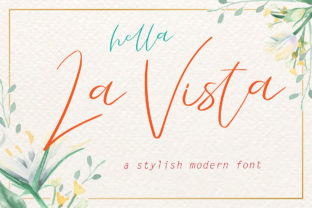
La Vista: A Light Script Font Built for Expressive, Handwritten Design
La Vista is a script font that captures the warmth and spontaneity of natural handwriting—without sacrificing refinement or typographic control. It’s not a rough sketch or a casual doodle turned into type; it’s a carefully crafted light script with graceful letterforms, subtle contrast, and a relaxed rhythm. What sets La Vista apart isn’t just its aesthetic—it’s how thoughtfully its features support real-world design work.
What Makes La Vista Distinctive
At its core, La Vista delivers a genuine handwritten feel through organic stroke variation, soft terminals, and gentle curves. Unlike many script fonts that rely on exaggerated flourishes or tight spacing to read as “handwritten,” La Vista achieves authenticity through subtlety. Its light weight gives it airiness and versatility—ideal for pairing with clean sans serifs or delicate serif companions.
One of La Vista’s most practical strengths is its PUA (Private Use Area) encoding. This means every alternate glyph, swash, ligature, and stylistic variant is accessible directly from your keyboard in design software—no need for OpenType panels or complex workarounds. You’ll find contextual alternates that shift letterforms depending on position (like an elegant entrance to a word), discretionary ligatures that fuse characters for smoother connections, and multiple versions of key letters like a, g, and y to avoid repetition in longer text.
It also includes small caps, old-style numerals, and punctuation variants—all designed to harmonize with its voice. That level of detail doesn’t just look polished; it reduces manual adjustments during layout, saving time without compromising expressiveness.
Where La Vista Fits Among Script Fonts
Script fonts fall along a spectrum—from formal calligraphic styles to playful brush scripts—and La Vista occupies a balanced middle ground. It’s lighter and more fluid than structured copperplate or Spencerian-inspired fonts, yet more intentional and consistent than freeform brush scripts that prioritize texture over legibility.
Compared to heavier script fonts, La Vista excels in contexts where visual breathing room matters: wedding stationery with minimalist layouts, editorial headers in lifestyle magazines, product packaging for wellness or artisanal brands, or digital interfaces requiring elegance without dominance. Its lightness makes it adaptable across print and screen, though users should test readability at smaller sizes—especially in body copy or UI labels, where its delicate strokes may soften on lower-resolution displays.
Unlike monoline scripts (which use uniform stroke weight), La Vista introduces gentle modulation—thicker downstrokes and thinner upstrokes—that echoes traditional penmanship. This adds dimension without complexity, making it easier to scale and pair than ultra-thin or ultra-bold alternatives.
Strengths and Practical Tradeoffs
Strengths:
- Expressive flexibility: With dozens of alternates and swashes, La Vista supports nuanced tone shifts—e.g., using a subtle entrance swash for a headline versus a simpler form for subheadings.
- Consistent rhythm: Letter spacing and baseline alignment are tuned for even flow, reducing the need for manual kerning in short-to-medium text blocks.
- Cross-format reliability: Well-hinted and optimized, La Vista renders cleanly in modern browsers, PDFs, and vector editors—unlike some highly decorative scripts that break in export or web embedding.
- Design efficiency: PUA encoding streamlines workflow, especially for designers who frequently iterate or collaborate across platforms (e.g., Figma, Illustrator, InDesign).
Tradeoffs to consider:
- Legibility at small sizes: Below 14–16pt in print or 18px on screen, details like fine terminals and thin strokes may blur or disappear—making it less suitable for footnotes, captions, or dense interface text.
- Limited language support: While covering Latin-based languages thoroughly (including extended diacritics), La Vista does not include Cyrillic, Greek, or Asian character sets—so multilingual branding projects may require supplemental fonts.
- Less impact in bold contexts: As a light-weight script, it doesn’t offer bold or black variants. Pairing it with a strong sans serif or serif for contrast is essential when hierarchy demands visual weight.
When La Vista Is the Right Choice
La Vista shines when the goal is refined expressiveness—not raw energy or strict formality. Consider it for:
- Branding with quiet confidence: A boutique skincare line, a slow-living blog, or a ceramic studio might use La Vista for logos or headlines to convey care, craft, and calm—without seeming stiff or overly ornate.
- Editorial accents: In a magazine spread about travel photography or sustainable design, La Vista can introduce a human touch in pull quotes or section dividers while letting body text remain highly readable.
- Digital invitations and announcements: Its smooth connectivity and range of swashes allow for custom, one-of-a-kind headers in email campaigns or web-based event invites—especially when paired with neutral supporting typefaces.
- Print collateral with tactile appeal: On textured paper or letterpress, La Vista’s lightness translates into elegant subtlety—think thank-you cards, recipe book covers, or art exhibition posters where typography should invite, not dominate.
When Another Option Might Serve Better
La Vista isn’t a universal solution—and that’s by design. If your project requires:
- High-contrast, dramatic presence: A luxury fashion campaign or high-energy music festival poster may benefit more from a bolder, higher-contrast script with sharper angles and stronger personality.
- Extended multilingual support: Projects targeting global audiences with non-Latin scripts will need complementary type families—or a different primary choice altogether.
- Functional UI typography: For buttons, navigation labels, or form fields, a highly legible, medium-weight sans serif remains more effective than any script font—even one as well-crafted as La Vista.
- Strict brand consistency across all touchpoints: If your system relies heavily on bold weights, condensed widths, or monospace elements, La Vista’s singular light script nature may create imbalance unless intentionally offset with strong secondary type choices.
Making an Informed Decision
Choosing a script font involves more than visual preference—it’s about matching typographic behavior to functional needs. La Vista earns its place when you value both aesthetic warmth and technical polish. Its PUA encoding, thoughtful alternates, and restrained lightness make it unusually versatile among expressive scripts—but only if those traits align with your project’s constraints and goals.
Before committing, test La Vista in context: set real copy at intended sizes, preview on target devices, and assess how it pairs with your supporting typefaces. Compare it against alternatives not just by appearance, but by how easily it adapts to your workflow, scales across formats, and sustains tone across applications.
For designers balancing creativity with clarity—and for brands seeking distinction without distraction—La Vista offers a compelling blend of artistry and utility. It doesn’t shout. It invites attention, then rewards it with thoughtful detail.