Master Script: Elegant Typography for Purposeful Design Workflows
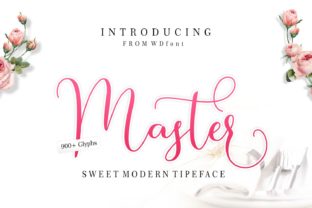
Master Script isn’t just another decorative font—it’s a deliberate design choice with functional weight. As a romantic script typeface, it carries expressive warmth and refined structure in equal measure. Its high contrast strokes, graceful terminals, and subtle flourishes give it presence without sacrificing legibility at moderate sizes. When used intentionally—paired thoughtfully, deployed contextually, and aligned with clear objectives—it becomes more than visual flair. It becomes part of the workflow itself.
Where Master Script Fits in Real Creative Processes
Typography choices rarely happen in isolation. They emerge from decisions about audience, medium, message tone, and timing. Master Script enters that chain most effectively when the goal is to signal sincerity, craftsmanship, or emotional resonance—whether you’re launching a boutique skincare line, designing an invitation suite for a milestone event, or crafting a signature brand voice for a coaching practice.
It works especially well in transitional moments: before a project begins (to define mood in a pitch deck), during execution (as headline treatment in a campaign rollout), or after delivery (in thank-you notes, certificates, or branded swag). Unlike utility fonts built for scanning or dense text, Master Script thrives where attention is invited—not demanded. That makes it ideal for touchpoints where pause, reflection, or personal connection matters.
Pairing With The Master: A Strategic Complement, Not Just Aesthetic Match
The Master—a clean, structured sans serif—was designed to balance Master Script’s fluidity. Together, they form a functional typographic system, not just a stylistic pairing. The contrast between them creates hierarchy without confusion: Master Script draws the eye and conveys character; The Master delivers clarity, scale, and readability in supporting roles.
This pairing functions like a well-organized team. Master Script handles the “why” and “who”—the emotional hook, the human voice. The Master handles the “what,” “when,” and “how”—the facts, timelines, features, and next steps. In practice, that means:
- A wedding invitation might use Master Script for names and date, with The Master for venue details, RSVP instructions, and timeline;
- A small business homepage could feature Master Script in the hero tagline (“Handcrafted with care”), while The Master anchors navigation, service descriptions, and contact information;
- An educator’s workshop handout might open with a Master Script title (“Your First Step Toward Clarity”), then rely on The Master for learning objectives, activity prompts, and resource links.
The pairing reduces cognitive load. Readers intuitively understand which elements carry emotional weight and which carry operational detail—without needing icons, color shifts, or excessive spacing to signal the difference.
Integration Into Existing Tools and Platforms
Master Script is available in OpenType format with standard and discretionary ligatures, making it compatible across Adobe Creative Cloud apps, Figma, Canva (via upload), and modern web environments using @font-face. For developers and marketers deploying branded assets, variable font options aren’t yet available—but consistent rendering is achievable through proper fallback stacks and size-aware scaling.
When embedding in email campaigns or landing pages, test legibility across devices. Master Script performs best above 24px for headlines and 18px for short subheads on desktop; mobile use benefits from tighter tracking adjustments and generous line height. Pairing it with The Master in CSS ensures typographic harmony even if one font fails to load—The Master serves as a robust, accessible fallback that preserves hierarchy and tone.
Practical Implementation Tips
Start small. Introduce Master Script in one high-impact location first—your logo lockup, a signature email footer, or a recurring social media template. Observe how it changes perception over time. Does engagement increase on posts using it? Do clients mention the “feeling” it evokes? Use those signals—not assumptions—to guide broader adoption.
Respect its rhythm. Romantic scripts like Master Script rely on spacing and proportion to breathe. Avoid cramming it into tight containers or stretching it unnaturally. Let letters sit with room to express their shape. If space is constrained, switch to The Master—or use Master Script only for the single most important word (e.g., “Yes,” “Now,” “Welcome”).
Keep licensing practical. Master Script is licensed per domain or per user depending on use case—freelancers managing multiple client sites should verify coverage; educators distributing printed materials should confirm classroom-use terms. When in doubt, consult the foundry’s license summary before finalizing a brand guideline or template library.
Workflow Alignment: From Planning to Long-Term Consistency
Integrating Master Script successfully depends less on technical setup and more on alignment with your planning rhythm. Ask yourself:
- What decisions does this font help clarify? (e.g., reinforcing brand maturity, distinguishing premium offerings, softening a technical message)
- Where do I already slow down to emphasize meaning? (e.g., closing statements, launch announcements, personalized outreach)
- What tools or templates would benefit most from consistent application? (e.g., Canva brand kits, Figma design systems, Google Slides master decks)
Answering those questions surfaces natural integration points—not forced ones. You’ll find Master Script fits cleanly into existing review cycles: include it in your brand audit checklist, add it to your pre-launch design QA list, or build it into your content calendar’s visual style notes for seasonal campaigns.
Long-term consistency comes from documentation—not repetition. Create a one-page internal guide: show approved sizes, spacing rules, pairings with The Master, and clear examples of what *not* to do (e.g., all-caps usage, low-contrast backgrounds, tight letter-spacing). Share it with contractors, interns, or cross-functional collaborators. That small act prevents drift and preserves intent across time and teams.
Quality Control and Usability Reality Checks
Not every project needs Master Script—and that’s by design. Its strength lies in selectivity. Overuse dilutes impact and risks visual fatigue. Before applying it, ask: does this element carry enough emotional or strategic weight to warrant its presence?
Also consider accessibility. While Master Script meets basic contrast requirements at recommended sizes, avoid using it for body text, data tables, or interface labels. Reserve it for headings, quotes, signatures, and short calls-to-action—then validate with real users, especially those who rely on screen readers or zoomed interfaces. The Master remains your go-to for anything requiring functional legibility.
Finally, track outcomes—not just usage. If you introduce Master Script into your newsletter subject lines, monitor open rates alongside sentiment in replies. If you apply it to packaging, note whether unboxing videos or customer photos reflect the tone you intended. Let real-world feedback—not trends or aesthetics alone—guide refinements.
Building Around the Typeface, Not Just With It
Master Script works best when treated as a node in a larger system—not a standalone solution. It connects to your brand voice (is your tone warm but precise?), your production cadence (do you batch-design seasonal assets?), and your audience’s expectations (will they recognize elegance as credibility or as distance?).
That means pairing it with intentional photography (soft focus, natural light), restrained color palettes (muted tones, ample white space), and measured copywriting (concise, human-centered phrasing). None of those elements need to change dramatically—but aligning them strengthens the whole.
For professionals managing multiple projects—freelancers juggling clients, educators updating course materials, entrepreneurs iterating on offers—Master Script becomes a quiet lever for coherence. One consistent voice across varied outputs builds recognition faster than any algorithm. And because it’s rooted in craft rather than novelty, it ages well. A 2025 brochure using Master Script won’t feel dated in 2028—if the underlying strategy remains sound.