Maychan: A Modern Script Font That Delivers Style—Without the Surprises
Maychan isn’t just another script font—it’s a carefully balanced blend of fluidity, femininity, and quiet confidence. With its smooth baseline, gentle curves, and consistent rhythm, it reads effortlessly at small sizes and shines boldly on apparel, packaging, and digital displays. Designers, small business owners, and creators reach for Maychan when they want elegance that feels approachable—not fussy—and personality that doesn’t sacrifice legibility.
Why People Choose Maychan (and Why Some Regret It Later)
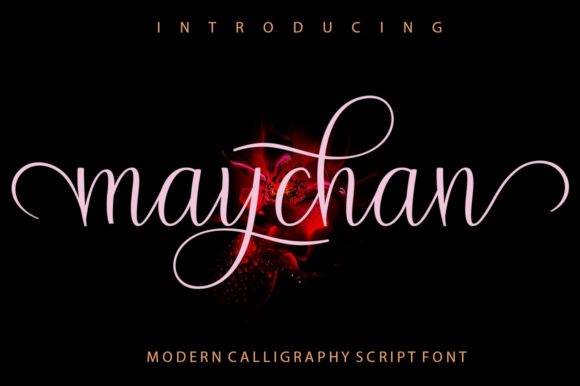
Many start with good intentions: a hand-lettered quote for Instagram, a boutique logo, or elegant thank-you cards for wedding clients. Maychan’s preview images often show clean, high-contrast mockups—white text on black, crisp t-shirt prints, or minimalist stationery. That’s helpful—but only if you know what’s *not* shown: how it behaves in real-world conditions.
The most common misstep? Assuming Maychan works equally well across all contexts without testing. Its open counters and delicate joins look stunning at 36pt on a greeting card—but shrink it to 10pt on a business card footer, and letters like “a,” “e,” and “s” can blur together. Likewise, its connected script style thrives in short phrases (“thank you,” “hello love”) but struggles with long paragraphs or all-caps settings. It’s not built for body text—and trying to force it there weakens both communication and credibility.
1. Licensing Isn’t One-Size-Fits-All
Maychan is available through multiple platforms—some offer personal-use-only licenses, others include commercial rights, and a few bundle web font access or extended usage (like merchandise resale). If you’re designing a client’s logo for a Shopify store selling T-shirts, a basic desktop license won’t cover it. Using Maychan without proper licensing may lead to takedowns, legal requests, or unexpected renewal costs later—especially if your client scales.
Better approach: Check the license terms *before* downloading—even if it’s free. Look for clear language around “merchandise,” “digital products,” “web embedding,” and “client work.” When in doubt, contact the foundry or vendor directly. Most reputable sellers respond within 48 hours.
2. Not All Files Are Created Equal
Some versions of Maychan include only the standard OTF file—great for print and static design—but lack OpenType features like stylistic alternates, ligatures, or swashes. Others ship with variable font support or web-optimized WOFF2 files. Skipping this step means missing out on subtle refinements: a more graceful “Th” ligature, optional flourishes on uppercase “Q” or “Y,” or automatic contextual substitutions that improve spacing in longer words.
Better approach: Download the full package if available—and test those features in your design app. In Adobe Illustrator or Affinity Designer, enable OpenType panels and toggle options like “Discretionary Ligatures” or “Stylistic Sets.” You’ll notice smoother connections and more natural flow—especially in multi-word quotes or monogrammed logos.
3. Color and Contrast Change Everything
Maychan’s thin strokes and soft terminals rely on strong contrast to stay readable. On light backgrounds with dark ink? Excellent. On pastel paper, textured fabric, or low-resolution screens? Letters can visually “fade” or appear broken. One freelance stationer printed Maychan in pale rose ink on ivory linen cardstock—only to find the “r” and “n” nearly vanished under soft lighting.
Better approach: Simulate real conditions early. Print a test strip at actual size on your intended paper stock. For apparel, order a single sample garment first. For web use, preview at 100% zoom on mobile and desktop—then reduce brightness to mimic dim room lighting. If details disappear, adjust stroke weight (via outline + stroke in vector apps) or choose a bolder companion font for supporting text.
Where Maychan Truly Excels—And Where to Pair It Thoughtfully
Maychan shines brightest in intentional, limited applications: a single-line brand tagline, a centered quote on a social post, foil-stamped names on wedding invites, or a signature-style logo lockup. Its strength lies in focus—not flexibility.
That said, pairing matters. Using Maychan alone for an entire brand system often backfires. It lacks a matching sans-serif or serif companion, so pairing it with a neutral, highly legible typeface (like Poppins, Inter, or Lora) creates balance. For example:
- A café logo uses Maychan for “The Daily Grind” and Inter Bold for “Espresso • Pastries • Community”
- A yoga studio’s Instagram caption pairs Maychan for “breathe in” with Source Sans Pro for class times and location
- A handmade soap label sets the product name in Maychan and ingredients in a clean, narrow sans-serif for scannability
These combinations don’t dilute Maychan’s charm—they anchor it in clarity.
A Final Practical Check Before You Commit
Before finalizing your decision, ask yourself three questions:
- What’s the primary use case? If it’s anything longer than five words—or needs to scale from billboard to business card—consider whether Maychan is the best tool, or just the most tempting one.
- Do I have the right license for how and where it will appear? Especially important for freelancers delivering assets to clients who may reuse them beyond your original scope.
- Have I tested it in context—not just as a standalone word, but as part of a full layout, with real colors, real materials, and real users in mind?
Maychan rewards thoughtful application. It’s not about avoiding it—it’s about using it where it adds meaning, not just decoration. When chosen with intention, tested with honesty, and paired with purpose, it becomes more than a font. It becomes part of your voice.