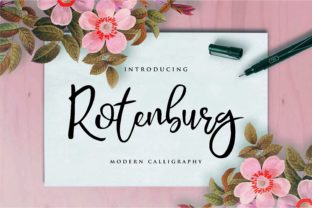
Rotenburg
Rotenburg is a modern calligraphy font distinguished by its dancing baseline—a subtle, rhythmic undulation that gives each line of text organic movement and visual warmth. Unlike rigid script fonts that prioritize uniformity, Rotenburg balances elegance with expressiveness: its letterforms are refined but never stiff, confident but never overpowering. It’s not just decorative—it’s functional typography designed for real-world use across branding, editorial design, digital interfaces, and personal creative work.
For professionals who rely on clarity and impact—whether launching a boutique product line, designing a workshop handout, or crafting a wedding invitation suite—Rotenburg serves as both a stylistic anchor and a workflow enhancer. Its strength lies in how it integrates into existing processes rather than demanding new ones. You don’t need to overhaul your design system to use it effectively. Instead, Rotenburg works where you already spend time: in layout tools, content management systems, presentation decks, and even handwritten-style digital notes.
Where Rotenburg Fits in Your Creative Process
Think of Rotenburg not as an endpoint—but as a strategic touchpoint. It often enters the workflow early, during mood board development or brand voice alignment. When you’re defining tone—say, for a wellness coach’s new email course or a ceramicist’s product packaging—you’ll likely test several typefaces against core messaging. Rotenburg stands out here because its baseline rhythm mirrors human cadence: calm but intentional, grounded but graceful. That resonance helps teams quickly align on aesthetic direction without lengthy debate.
During execution, Rotenburg excels in high-impact, low-volume applications. Use it for headlines, pull quotes, logo lockups, or signature lines—not body copy. Its legibility at small sizes is strong, but its personality shines best when given breathing room. In Figma or Adobe XD, pair it with a neutral sans-serif (like Inter, Manrope, or IBM Plex Sans) for contrast and hierarchy. This pairing isn’t arbitrary—it reflects a deliberate division of labor: Rotenburg carries emotional weight; the sans-serif delivers information efficiently.
Compatibility and Setup Considerations
Rotenburg is available in OpenType format with standard ligatures and stylistic alternates. It supports Latin-based languages and includes full punctuation, numerals, and basic diacritics—enough for most English-language projects and many multilingual contexts. Before importing it into Canva, Webflow, or Notion, verify whether your platform supports OpenType features. Some web hosts require manual @font-face declarations or variable font configuration for optimal rendering.
If you're embedding Rotenburg on a client website, consider file size and fallback behavior. A single-weight version (e.g., Regular only) keeps load times minimal while preserving character. For print workflows, export PDFs with fonts embedded—especially if sharing files with printers unfamiliar with the typeface. Always name layers and styles consistently in design files (e.g., “Rotenburg Headline – 36pt”) so collaborators know intent at a glance.
Practical Implementation Across Roles
Freelancers and small business owners often use Rotenburg to elevate perceived value without increasing production cost. A freelance photographer might apply it to a custom invoice header or portfolio cover slide—small touches that signal attention to detail and reinforce premium positioning. No extra software needed: paste the font into Keynote or Google Slides (via desktop upload), then style titles consistently across all client-facing assets.
Educators and workshop facilitators find Rotenburg effective for printed handouts or slide decks where tone matters. A mindfulness instructor using Rotenburg for session titles (“Breathe In”, “Pause Here”, “Return Gently”) creates immediate psychological framing—softening transitions between activities. Because the baseline movement feels gentle—not erratic—it supports focus rather than distraction.
Bloggers and content creators integrate Rotenburg into featured image templates (e.g., Pinterest pins or Substack banners). Since social platforms compress images, use bold weight variants and generous letter spacing to maintain readability. Avoid stacking multiple Rotenburg layers in one graphic—its strength is singularity. One well-placed phrase, sized appropriately, communicates more than three competing typographic elements.
Workflow Integration Tips
- Start with constraints. Define where Rotenburg will appear *before* opening your design tool: “Only for H1s in the homepage hero section” or “Exclusively in email subject lines for Q4 campaigns.” Boundaries prevent overuse and preserve impact.
- Build reusable components. In Figma or Sketch, create a “Rotenburg Style Kit” with preset text styles (headline, subhead, callout) and export them as shared libraries. Team members apply consistent formatting without reselecting font weights or tracking values.
- Test before finalizing. Print a sample at actual size—or view on mobile—to confirm spacing and rhythm read as intended. What looks fluid on a 27-inch monitor can feel cramped on a 6-inch screen.
- Document usage rules. Add a brief note in your brand guidelines: “Rotenburg is used for expressive emphasis, never for body text or data tables. Pair exclusively with [X] sans-serif for UI elements.” Clarity prevents drift over time.
Long-Term Use and Consistency
Rotenburg holds up well over time because it avoids trend-dependent quirks—no exaggerated swashes, no forced irregularity. Its elegance comes from proportion and balance, not novelty. That makes it easier to maintain consistency across evolving projects. A small bakery that launched with Rotenburg on its first menu can continue using it five years later on seasonal packaging, loyalty cards, or staff aprons—without feeling dated.
Still, consistency requires intention. Audit your assets every quarter: open your latest newsletter, landing page, and social post side-by-side. Does Rotenburg serve the same purpose in each? Is spacing uniform? Are weights balanced? Small deviations compound—especially when multiple people contribute to content. A quick 10-minute review catches drift before it becomes systemic.
When Rotenburg Isn’t the Right Fit
Rotenburg thrives in contexts where tone, identity, and emotional resonance matter—but it’s less effective where speed, density, or neutrality dominate. Avoid it for legal disclaimers, technical documentation, dashboards, or multi-step forms. In those cases, legibility and scanability outweigh stylistic nuance. Also skip Rotenburg for long-form reading online: its baseline variation, while beautiful, introduces micro-friction for extended scanning.
Don’t force integration where it doesn’t align with user needs. If your audience is primarily accessing content via screen readers, ensure Rotenburg is reserved for purely visual elements—and that all critical information remains accessible through semantic HTML structure and alt text.
Getting Started Without Overcomplicating
You don’t need a full brand audit to begin using Rotenburg meaningfully. Pick one recurring asset—your email signature, your Instagram story highlight covers, or your weekly team meeting agenda—and apply it there for two weeks. Observe how it changes perception: Do clients comment on polish? Do teammates ask where you got the font? Does it make your own work feel more intentional?
Then expand deliberately. Add it to one more context only after you’ve confirmed it’s working. This incremental approach builds confidence, reveals practical limitations early, and ensures Rotenburg enhances—not interrupts—your existing workflow.
Ultimately, Rotenburg works because it respects process. It doesn’t demand reinvention. It asks only that you choose where elegance matters most—and then lets the type do the rest.