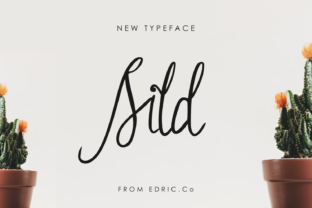
Sild: A Handwritten Font That Fits Real Workflows
Sild is a beautifully crafted handwritten font designed for people who value authenticity, elegance, and intentionality in their visual communication. It’s not just decorative—it’s functional. With two distinct yet harmonious styles—regular and italic—Sild supports clarity without sacrificing warmth. Whether you’re crafting a client presentation, designing course materials, launching a small business brand, or preparing a personal newsletter, Sild works where handwriting adds meaning: in moments that call for humanity, trust, and attention.
Where Sild Fits in Your Creative and Professional Process
Fonts aren’t chosen in isolation—they’re selected as part of a larger workflow. Sild enters most naturally during the refinement phase: after content is drafted, strategy is outlined, and structure is confirmed. It’s rarely the first font you pick—but often the right one to finalize tone, elevate hierarchy, or soften formality without losing professionalism.
For educators building slide decks or handouts, Sild’s regular weight works well for headings and pull quotes, while the italic adds gentle emphasis to definitions or reflections—reinforcing pedagogical intent without visual clutter. Marketers testing email subject lines or landing page headers find Sild effective for A/B tests where warmth and approachability influence open rates and conversions. Freelancers packaging proposals use it sparingly on cover pages or signature blocks to signal care and individuality—without undermining credibility.
How Sild Integrates With Other Tools and Platforms
Sild is delivered as standard OpenType (.otf) files, making it compatible with all major design and publishing tools: Adobe Creative Cloud (Photoshop, Illustrator, InDesign), Figma, Affinity Suite, Canva (via upload), and even Microsoft PowerPoint and Word on macOS and Windows. No plugins or subscriptions are required—just install, select, and apply.
Because it’s a single-weight pair (regular + italic), Sild avoids the complexity of multi-style families—no need to manage dozens of weights or widths. This simplifies version control, file sharing, and cross-device consistency. When collaborating in Figma or shared cloud folders, team members won’t encounter missing fonts if Sild is installed locally—or if embedded in PDF exports, its glyphs render reliably.
It pairs cleanly with neutral sans-serifs like Inter, Lato, or Helvetica Neue for body text. That contrast—handwritten heading + clean paragraph—creates visual rhythm without competing voices. For web use, Sild can be self-hosted via @font-face, though it’s best reserved for headings, logos, or short interactive elements (like hover states or micro-animations), since handwritten fonts perform best at larger sizes and lower volumes.
Practical Implementation Tips for Consistent Results
Start small. Apply Sild only where it serves a purpose—not everywhere. Overuse dilutes impact and risks visual fatigue. A common and effective pattern: use Sild Regular for section titles, Sild Italic for subheadings or callouts, and a highly legible sans-serif for paragraphs and captions.
Pay attention to spacing. Handwritten fonts rely on natural letterfit and rhythm. Avoid aggressive tracking adjustments or forced justification. Let Sild breathe—especially in print or high-resolution displays. In digital interfaces, test readability at 16–24px for headings; below 14px, legibility drops noticeably due to its organic stroke variation.
Use italic intentionally—not just for emphasis, but for voice. In storytelling formats (blogs, newsletters, case studies), Sild Italic can represent internal thought, quoted reflection, or gentle transitions between ideas. This subtle semantic layer strengthens narrative flow without requiring extra UI elements.
Preparing for Long-Term Use Across Projects
If you plan to use Sild across multiple clients, brands, or publications, consider creating a lightweight style guide snippet. Note your preferred size ranges, color contrast ratios (e.g., #2D3748 on #F7FAFC for accessible light backgrounds), and pairing rules. Save these as reusable Figma text styles or Adobe library entries—this ensures consistency without manual reconfiguration each time.
Also document licensing. Sild is licensed for both personal and commercial use, including client work and digital products—but not for resale as part of a font bundle or SaaS platform UI. If you’re building templates for sale (e.g., Notion or Canva templates), verify usage rights align with your distribution model. Most users won’t need to worry—but clarity here prevents friction later.
For Small Business Owners
A local bakery launching seasonal packaging might use Sild Regular for the product name (“Honey Lavender Loaf”) and Sild Italic for the tagline (“Baked fresh every morning”). Paired with uncoated kraft paper and minimalist photography, the font reinforces craft and care—without needing illustration or custom lettering. The same files then adapt to Instagram story highlights and printed menu boards, maintaining cohesion across touchpoints.
For Educators and Course Creators
When designing a self-paced online module, Sild Regular introduces each lesson title, while the italic version highlights key takeaways in summary cards. Because it’s installed locally and embeds cleanly into exported PDFs or SCORM packages, learners see consistent typography regardless of device or LMS rendering quirks. No web font loading delays. No fallback surprises.
For Bloggers and Content Writers
Instead of defaulting to generic script fonts for post titles, try Sild Regular at 36–48px with generous line height. Pair it with a tight, highly readable body font—and use Sild Italic only for short epigraphs or author asides. This creates visual breathing room and subtly signals shifts in voice or perspective, helping readers parse long-form content more intuitively.
What to Watch For: Usability and Quality Control
Sild’s strength lies in its authenticity—but that also means it’s not optimized for dense data tables, code snippets, or multilingual character sets beyond basic Latin (including accented characters used in French, Spanish, German, and Scandinavian languages). If your work regularly includes Cyrillic, Greek, or extended diacritics, verify coverage before committing to large-scale use.
Proofread carefully when using Sild Italic for longer phrases. Its fluid rhythm can occasionally cause ambiguous letterforms at smaller sizes (e.g., “rn” vs. “m”, “cl” vs. “d”). Keep it to short labels, quotes, or single-line emphasis—never full paragraphs or legal disclaimers.
Finally, audit contrast. While elegant on light backgrounds, Sild loses definition against busy textures or low-contrast gradients. Always test on actual output devices—especially if printing on textured stock or projecting in ambient light.
Making Sild Part of Your Routine—Without Adding Overhead
You don’t need to overhaul your toolkit to benefit from Sild. Install it once. Bookmark your go-to size/weight combinations in a notes app. Save two Figma text styles or Adobe Character Styles named “Sild Heading” and “Sild Accent”. That’s enough to begin integrating it deliberately—not decoratively.
Over time, you’ll notice patterns: where Sild helps slow down a reader’s eye, where it invites closer attention, where it quietly replaces a stock image or icon by carrying emotional weight through shape alone. That’s not font magic—that’s thoughtful implementation meeting intentional design.
Sild doesn’t solve problems on its own. But in the right place—applied with awareness of context, audience, and medium—it supports clarity, builds connection, and reflects the care already present in your work. And that’s how elegant typography earns its place in real workflows.