Struggling: A Handwritten Font That Balances Personality and Practicality
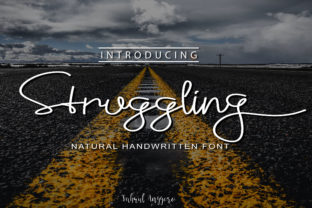
Struggling isn’t a font that shouts — it leans in, writes with intention, and leaves space for authenticity. As a natural handwritten typeface, it captures the subtle imperfections of real pen-on-paper movement: slight variations in stroke weight, gentle tapering on terminals, and organic spacing that avoids mechanical rigidity. Unlike many script fonts that prioritize flourish over function, Struggling was built with legibility as a non-negotiable foundation. That balance — between human warmth and clear communication — is what makes it worth considering for professionals who need personality without sacrificing professionalism.
What Sets Struggling Apart From Other Handwritten Fonts
Most handwritten fonts fall into one of two categories: highly decorative (ideal for short bursts like logos or posters) or overly simplified (designed for readability but at the cost of character). Struggling occupies a thoughtful middle ground. Its lowercase letters feature open counters and generous x-heights, which improve recognition at smaller sizes — a critical detail when designing business cards, watermarks, or digital overlays. Uppercase forms retain gesture and flow but avoid excessive loops or ligatures that can hinder scanning. There’s no forced cursive connection between every letter, meaning it works well both as a full-word treatment and in mixed typography layouts.
The rhythm feels intentional, not erratic. Letters don’t wobble unpredictably, nor do they mimic calligraphy tools that require specialized skill to deploy effectively. Instead, Struggling reads like confident handwriting — the kind you’d see on a well-designed wedding invitation or a boutique brand’s packaging. It’s not trying to be “perfectly imperfect.” It’s simply consistent enough to build trust, expressive enough to reflect voice.
Real-World Performance Across Mediums
In print, Struggling holds up well across common substrates — from matte-coated magazine stock to textured letterpress paper. Its stroke contrast is moderate, avoiding the thin hairlines that disappear on low-resolution printers or the heavy weights that bleed on uncoated surfaces. On screen, it renders cleanly down to 16px in body text applications — though its sweet spot remains headlines, pull quotes, and short-form branding elements where its personality shines without compromising clarity.
One practical observation: Struggling performs especially well as a secondary font alongside neutral sans-serifs like Inter, Lato, or Montserrat. Pairing it with those typefaces creates visual hierarchy without dissonance — the handwritten element adds warmth and distinction without overwhelming the layout. For example, a small business owner might use Montserrat for navigation and body copy on their website, then apply Struggling sparingly to taglines, testimonial highlights, or CTA buttons. That approach reinforces brand voice while maintaining accessibility and load performance.
Use Cases Where Struggling Delivers Measurable Value
Struggling excels where authenticity matters more than formality — and where readability still carries weight. Here are several scenarios where it consistently delivers:
- Branding for service-based businesses: Therapists, life coaches, educators, and wellness practitioners often seek fonts that feel approachable yet grounded. Struggling supports that tone without veering into childish or overly casual territory.
- Editorial design: Magazines and newsletters use Struggling for pull quotes, section dividers, or masthead accents. Its structure ensures it doesn’t compete with body text, yet adds editorial personality.
- Wedding and event materials: Invitations, menus, and signage benefit from its warmth and elegance — particularly when paired with minimalist layouts. It avoids the ornate density of traditional script fonts, making it easier to adapt across digital RSVPs and printed programs.
- Watermarks and overlays: Because of its moderate contrast and clean outlines, Struggling remains legible even at low opacity levels. Designers report success using it subtly behind photography or as faint background text in presentations.
- Logos and monograms: While not ideal for ultra-small icon-sized applications, Struggling scales well from business card size up to large-format posters. Its letterforms retain identity without distortion.
Who Benefits Most — and When to Pause
Freelancers, small business owners, and content creators who manage their own visual identity will find Struggling most valuable when consistency and tone matter more than mass scalability. If your workflow involves frequent rebranding, client-facing templates, or multi-channel asset creation (e.g., social graphics, email headers, print collateral), Struggling offers reliable flexibility — especially when used intentionally rather than ubiquitously.
That said, it’s not universally appropriate. Avoid using Struggling for long-form body copy, data-heavy reports, or interfaces requiring rapid information scanning (like dashboards or e-commerce filters). It also doesn’t replace system fonts in accessibility-critical contexts — screen readers won’t interpret stylistic intent, and users relying on high-contrast modes may lose nuance. As with any display font, test with real users when possible, especially if your audience includes people with dyslexia or low vision.
Quality, Consistency, and Long-Term Usability
Struggling ships with standard OpenType features including ligatures, alternate characters, and multilingual support covering Western European languages. Kerning pairs are thoughtfully adjusted, reducing awkward gaps between common letter combinations like “To”, “We”, or “The”. The font file itself is lightweight — under 100 KB — which helps maintain site speed when self-hosted. No webfont hosting dependencies or licensing complications arise from typical commercial use, assuming proper licensing is obtained.
From a design longevity perspective, Struggling avoids trend-driven extremes. It doesn’t mimic current micro-trends like exaggerated bounce or chaotic baseline shifts. Instead, it reflects a timeless interpretation of handwriting — one that’s likely to remain relevant through multiple design cycles. That makes it a sound investment for brands building equity over time, rather than chasing short-term visual novelty.
Practical Recommendations for Getting Started
Start small. Apply Struggling to one high-impact element first — perhaps a logo lockup, a signature line in email footers, or a recurring quote style in blog posts. Observe how it interacts with your existing palette and layout rhythm. Adjust tracking slightly (+10–20 units) if using it in all-caps settings to preserve openness. Avoid automatic all-caps CSS transformations; instead, use the font’s native uppercase glyphs for optimal spacing.
If pairing with other fonts, prioritize contrast in proportion and tone — not just weight. A geometric sans-serif complements Struggling’s organic flow better than another handwritten option. And when exporting for print, always convert text to outlines if sending files to third-party vendors, ensuring rendering consistency.
Ultimately, Struggling earns its place not by being the most versatile font available, but by doing a specific job exceptionally well: lending sincerity and clarity to moments where voice matters. It won’t solve every typographic challenge — but for designers and communicators who value authenticity rooted in craft, it remains a quietly effective tool.