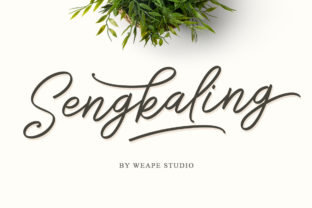
Sengkaling Script: A Practical Monoline Script Font for Real-World Workflows
Sengkaling Script is a monoline script font designed for speed, consistency, and expressive variation—without sacrificing legibility or usability. Each character includes multiple stylistic alternates, enabling natural rhythm and visual diversity in headlines, quotes, branding elements, and short-form content. Its fast-hand sweep style mimics confident, fluid handwriting, but with the precision and reproducibility needed for digital and print execution.
Where Sengkaling Script Fits Into Your Workflow
Fonts aren’t standalone tools—they’re workflow accelerators. Sengkaling Script works best when integrated into stages where tone, personality, and clarity matter more than neutrality. Think of it as a design decision you make early—not after layout is locked, but while defining voice and visual hierarchy. It’s not meant for body text or data tables. Instead, it shines where human connection is the goal: email subject lines, social media banners, workshop handouts, product packaging accents, or podcast episode thumbnails.
Unlike variable fonts that adjust weight or width dynamically, Sengkaling Script delivers variation through intentional glyph substitution. That means its flexibility comes from your choices—not algorithmic interpolation. You decide when to swap an ‘a’ for its looped alternate, or rotate between two ‘t’ forms to break repetition. This gives you direct control over texture and pacing, which matters when building cohesive brand assets across platforms.
Using Sengkaling Script Before a Project Begins
Before opening Figma or drafting copy, consider how Sengkaling Script can shape your project’s identity. If you’re launching a wellness newsletter, sketching a logo concept, or preparing a pitch deck, test Sengkaling Script against your core message. Does “Breathe Deeply” feel grounded and warm in this typeface? Does “Join the Workshop” convey approachability without looking casual to the point of informality?
This pre-project use isn’t about finalizing design—it’s about calibrating tone. Because Sengkaling Script has strong personality, it reveals misalignments early. If your messaging feels stiff or overly polished next to its flowing strokes, that’s useful feedback—not a limitation. Use it as a litmus test before investing time in mockups or asset creation.
During Execution: Pairing and Platform Considerations
When implementing Sengkaling Script mid-project, pairing is critical. Its monoline nature pairs cleanly with geometric sans-serifs (like Inter, Poppins, or Montserrat) and restrained serifs (such as Lora or Merriweather). Avoid competing scripts or high-contrast fonts—they’ll clash tonally and visually. Stick to one primary type family for body and headings, then reserve Sengkaling Script for moments requiring emphasis: pull quotes, call-to-action buttons, signature lines, or section dividers.
On digital platforms, Sengkaling Script performs well in static visuals—social posts, Canva templates, email headers—but avoid using it in live web text unless embedded via @font-face with proper fallbacks. Most CMS platforms don’t support OpenType features like stylistic sets out of the box, so plan ahead: generate SVG versions for logos, or pre-render key phrases as PNGs if dynamic rendering isn’t viable.
For print, ensure your file export preserves glyph substitutions. In Adobe apps, enable “Contextual Alternates” and “Stylistic Sets” in the Character panel. In Affinity Designer or Figma (with plugins), manually activate alternates before exporting. Skipping this step results in default glyphs only—losing the very variation that makes Sengkaling Script distinctive.
After Delivery: Consistency and Long-Term Usability
Once a project ships, Sengkaling Script continues to serve—if used intentionally. Reuse established alternates across touchpoints: the same ‘S’ flourish in your Instagram bio should match the one in your PDF welcome guide. Document those choices in a simple brand reference sheet—not just font name, but which alternates were selected for key letters and why (e.g., “‘E’ with upward exit stroke used in all headlines for energetic lift”).
This level of documentation pays off during refreshes or team handoffs. When a new designer joins or you revisit a campaign six months later, consistent usage prevents visual drift. It also simplifies localization—if translating into Indonesian or Spanish, maintain the same letterform logic for initials and acronyms, even if full words change.
Practical Tips for Smoother Integration
- Start small: Apply Sengkaling Script to one recurring element first—like email signatures or slide footers—before scaling to full templates.
- Test at real size: At 16px on screen or 8pt in print, some alternates lose impact. Preview at actual usage scale, not just zoomed-in design views.
- Leverage naming conventions: Save alternate-heavy versions with clear labels (e.g., “Sengkaling_Signature_v2_OT” vs. “Sengkaling_WebFallback”) to avoid accidental swaps.
- Check licensing scope: Verify whether your license covers web embedding, app UI, or merchandise—especially if selling physical products with custom lettering.
- Use spacing deliberately: Its sweeping forms benefit from generous letter-spacing (50–100 units in most apps). Tight tracking undermines its hand-drawn flow.
How Sengkaling Script Interacts With Other Tools and Decisions
Sengkaling Script doesn’t replace strategy—it clarifies it. When choosing between two brand directions, setting it against each option surfaces subtle differences in perceived warmth, authority, or accessibility. Likewise, when selecting a color palette, try it in grayscale first. Its monoline structure reveals contrast issues faster than multi-weight fonts.
In collaborative environments, share a lightweight demo file—not just the font file—with teammates. Include examples of preferred alternates, spacing guidelines, and common pitfalls (e.g., “Avoid using the swash ‘Q’ in all-caps contexts—it overpowers adjacent letters”). This reduces back-and-forth and builds shared understanding without requiring everyone to master OpenType settings.
It also interfaces meaningfully with content planning. If you schedule monthly quote graphics, build a rotating set of Sengkaling alternates into your calendar—assigning different ‘g’ or ‘y’ forms per month. That small act adds visual continuity without extra design time.
Maintaining Quality Control Over Time
Because Sengkaling Script relies on manual alternates, quality control happens at the point of use—not during font installation. Keep a checklist: Are baseline alignments consistent across lines? Is vertical rhythm preserved when mixing uppercase and lowercase? Do descenders clear surrounding elements in tight layouts?
For teams, integrate quick visual audits into your review process. Add a line to your proofing checklist: “Verify Sengkaling alternates match documented standards.” It takes under ten seconds—and prevents inconsistencies that erode brand trust over time.
Long-term, revisit your usage annually. As your audience evolves or platforms update rendering engines, reassess whether current alternates still perform. You might retire one flourish and adopt another—not because the font changed, but because your context did.
Final Thought: It’s About Intention, Not Just Aesthetics
Sengkaling Script works because it rewards attention. It asks you to choose—not just apply. That makes it especially valuable for professionals who balance speed with intentionality: educators designing engaging lesson headers, freelancers refining client presentation decks, marketers crafting scroll-stopping social hooks, or small business owners personalizing packaging details.
You don’t need to use every alternate. You don’t need to deploy it everywhere. But when you do choose Sengkaling Script—and choose deliberately—you’re not just selecting a font. You’re making a small, repeatable commitment to clarity, craft, and human-centered communication.